Billing Dashboard
The Billing Dashboard in Yeedu is designed to monitor and calculate resource usage using Yeedu Compute Units (YCU) for all tenants. It provides accurate tracking of usage across multiple time granularities—hourly, daily, and monthly—and offers flexible filtering to analyze costs across different dimensions such as tenants, clusters, machine types, labels, and cloud providers.
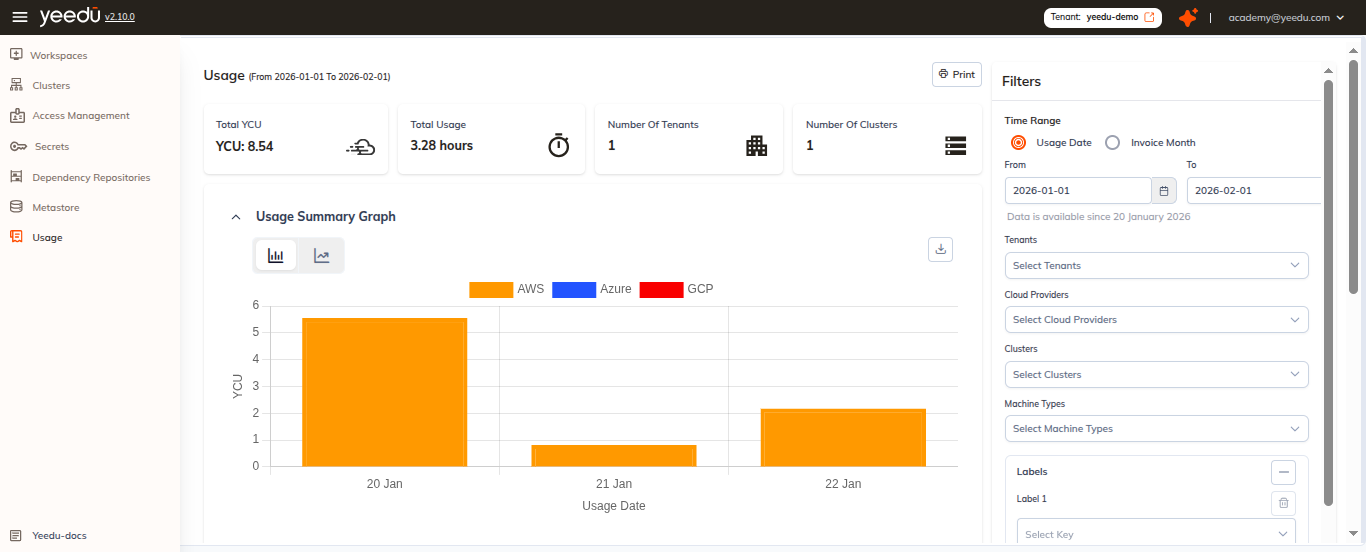
Overview (billing-home)
Key Metrics
- Total YCU: Total number of YCUs (Yeedu Compute Units) consumed.
- Total Minutes of Usage: Aggregate runtime of all resources, measured in minutes.
- Number of Tenants: Total tenants associated with usage.
- Number of Clusters: Total number of clusters created.
Usage Summary
- Usage Summary Graph: Visual representation of YCU consumption over time, based on usage date and grouped by cloud providers.
Usage Details
- Tenant: Tenant associated with the cluster usage.
- Cluster: Name of the cluster used.
- Machine Type: Machine type configured for the cluster.
- YCU / Hour: Hourly YCU consumption for the machine type.
- Usage Date: Date on which the cluster was utilized.
- Minutes of Usage: Total duration the cluster remained active.
- Total YCU: Final cost calculated using YCU/hour and total minutes of usage.
Export
- The Print button at the top of the Billing Dashboard allows users to download a PDF version of the billing report.
Filters
Users can refine billing data using the following filters:
- Time Range: Select a time range for filtering billing data.
- Filter by Usage Date or Invoice Month
- Tenant: Filter data by one or more tenants.
- Cloud Provider: Filter based on the cloud provider.
- Cluster: Filter by specific clusters.
- Machine Type: Filter by machine type.
- Label: Filter by labels associated with resources.
Filter Actions
- Clear All: Resets and clears all applied filters.
- Apply: Applies the selected filters to the Billing Dashboard.
Users can select multiple filters simultaneously based on their requirements.
Access Control
- Only users with the Platform Billing role can access the Billing Dashboard.
Note
- The recommended screen resolution for the Yeedu UI is 1920 × 1080 for the best experience.