Yeedu High Availability
Yeedu High Availability Introduction
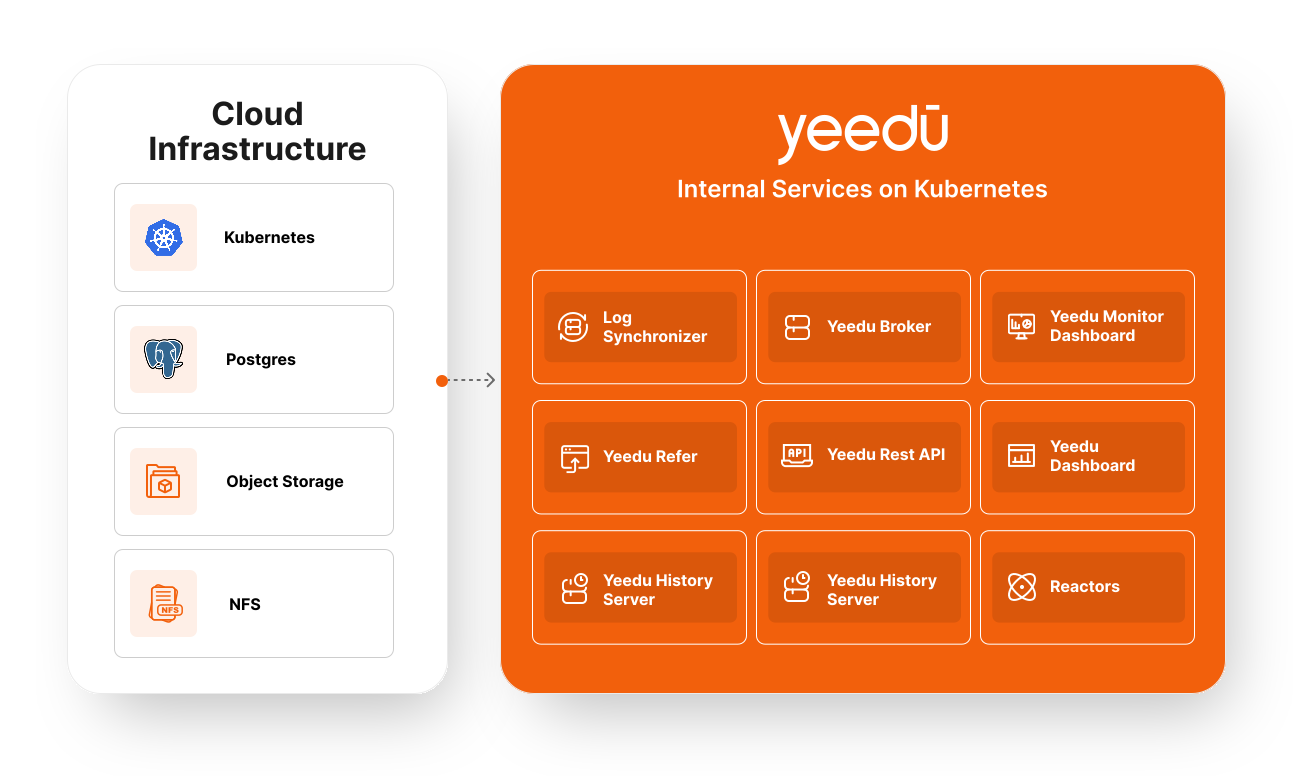
Yeedu runs entirely on Kubernetes, and its availability characteristics come from two places: the Kubernetes controllers that keep workloads running, and the high-availability features of the cloud-managed services (PostgreSQL, object storage, NFS) that a deployment is pointed at.
This page describes what the shipped Helm charts actually configure. Everything
below is taken from kubernetes/yeedu-tps/values.yaml,
kubernetes/yeedu-ycs/values.yaml and the templates under
kubernetes/yeedu-ycs/templates/ in the Core Services Formation repository.
We don't publish an RTO or RPO commitment for our own services. Recovery time and recoverable data both depend on how you configure the cloud-managed PostgreSQL, object storage and NFS backing the deployment. See Disaster Recovery Strategy for how those choices affect recovery.
Cloud Infrastructure Components
The availability of these components is supplied by your cloud provider, not by the Yeedu charts. Enable the relevant HA features when you provision them.
| Service | Description | HA responsibility |
|---|---|---|
| PostgreSQL | Metadata database and system of record | In cloud deployments Yeedu connects to a customer-supplied managed PostgreSQL; availability comes from that service's HA option (for example a Multi-AZ standby). The in-cluster yeedu-postgres deployment shipped for local/dev installs runs a single replica and isn't highly available. |
| Object Storage | Persistent store for job logs and Spark event logs | Cloud-native object store durability and replication. |
| NFS | Shared file system across services | A managed NFS service (AWS EFS, GCP Filestore, Azure Files) with the availability tier you select. |
| Kubernetes | Orchestration engine for all Yeedu services | Managed control-plane availability, plus the controller behaviour described below. |
Kubernetes-Level Behaviour
All Yeedu components are deployed into a Kubernetes cluster, which provides:
- Pod auto-healing: the Deployment/StatefulSet controller replaces failed or deleted pods to restore the configured replica count.
- Liveness and readiness probes: configured on
yeedu-restapi,yeedu-vault,yeedu-history-server,yeedu-functions-proxyand the in-clusteryeedu-postgresdeployment. The remaining workloads rely on container restart and the controller's replica reconciliation only. - Horizontal Pod Autoscaling: the charts define exactly one HorizontalPodAutoscaler, for the REST API (see below). No other Yeedu component autoscales.
Core Yeedu Internal Services
Yeedu REST API
The central API layer. It's the only component with autoscaling configured:
restapi-hpa.yml sets minReplicas: 1, maxReplicas: 3 and scales on CPU at
averageUtilization: 80. Liveness and readiness probes are configured.
Yeedu Reactors
yeedu-reactors-cosi is a StatefulSet with replicas: 1 fixed in the template.
It executes backend compute functions and jobs and depends on the broker, cache
and vault.
Log Synchronizer
The log synchronizer isn't a separate workload. It runs as the
yeedu-reactors-logs-sync sidecar container inside the yeedu-reactors-cosi
StatefulSet, so it shares that pod's single replica and lifecycle. It ships
application and platform logs to object storage.
The synchronization interval is set inside the log-sync image and isn't exposed in the Helm chart.
Yeedu Broker
The broker is RabbitMQ, deployed as a RabbitmqCluster resource named
yeedu-rabbitmq3 with replicas: 3. Clustered RabbitMQ tolerates the loss of
individual nodes; the chart doesn't configure a queue type, so durability of
in-flight messages follows RabbitMQ's defaults for whatever queues the
application declares.
Yeedu Cache
The cache is Redis, deployed from the Bitnami Redis chart in its
master-replica configuration: one master plus replica.replicaCount: 3 read
replicas, each with 50Gi of persistent storage.
Yeedu Vault
Secret management, backed by PostgreSQL. vault.replicaCount: 1. Liveness and
readiness probes are configured. Its availability follows the availability of
the PostgreSQL backend.
Yeedu Monitor Dashboard
Grafana, with InfluxDB as the metrics store. grafana.replicaCount: 1 and
influxdb.replicaCount: 1. Neither autoscales.
Yeedu UI
The end-user interface. ui.replicaCount: 1. There's no UI
HorizontalPodAutoscaler.
Yeedu History Server
Serves Spark job and pipeline execution history from object storage.
historyserver.replicaCount: 1, with liveness and readiness probes configured.
Yeedu Functions
Three workloads: a scheduler, a Celery worker and a proxy.
functions.celery.replicaCount: 1 and functions.proxy.replicaCount: 1.
Liveness and readiness probes are configured on the proxy.
Configured Replica Counts
The values below are the chart defaults. They can be raised per deployment by
overriding the corresponding replicaCount value.
yeedu-tps chart (platform services)
| Component | Replicas | Workload type |
|---|---|---|
yeedu-postgres | 1 | Deployment |
yeedu-ldap | 1 | Deployment |
yeedu-redis | 1 master + 3 replicas | Bitnami Redis chart |
yeedu-rabbitmq3 | 3 | RabbitmqCluster |
yeedu-ycs chart (Yeedu core services)
| Component | Replicas | Workload type |
|---|---|---|
yeedu-restapi | 1, autoscaled to a maximum of 3 at 80% CPU | Deployment + HPA |
yeedu-ui | 1 | Deployment |
yeedu-vault | 1 | Deployment |
yeedu-grafana | 1 | Deployment |
yeedu-influxdb | 1 | Deployment |
yeedu-history-server | 1 | Deployment |
yeedu-reactors-cosi | 1 (fixed in the template) | StatefulSet |
yeedu-reactors-monitor | 1 | Deployment |
yeedu-functions-celery | 1 | Deployment |
yeedu-functions-proxy | 1 | Deployment |
The bundled Airflow subchart is disabled by default (airflow.enabled: false).
When enabled, its scheduler, triggerer, worker, API server and DAG processor are
each configured with a single replica.
Summary
Most Yeedu services run as a single replica and rely on Kubernetes to restart or reschedule a failed pod. The components deployed with redundancy today are the RabbitMQ broker (3 nodes), the Redis cache (master plus 3 replicas), and the REST API (autoscaled between 1 and 3). Availability of the metadata database, object storage and NFS is provided by the cloud services you point the deployment at, so configure their HA options according to the availability you need.