Overview
Secrets store credentials (API keys, tokens, service-account JSON, and connection credentials) so they don't have to be written into job or notebook code.
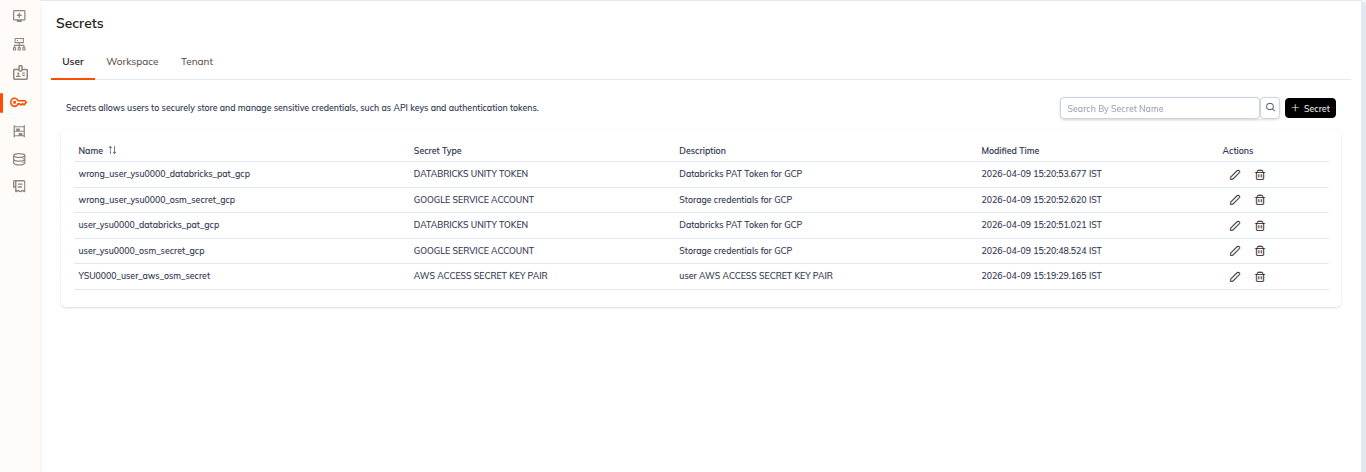
The Secrets page carries this info bar:
Secrets allows users to securely store and manage sensitive credentials, such as API keys and authentication tokens.
Secret Scopes
We organise secrets into three scopes, exposed as three tabs on the Secrets page. User is the landing tab.
| Tab | List route | Create route |
|---|---|---|
| User (default) | /tenant/<tenantId>/secrets/user | /tenant/<tenantId>/secrets/create-user-secret |
| Workspace | /tenant/<tenantId>/secrets/workspace | /tenant/<tenantId>/secrets/create-workspace-secret |
| Tenant | /tenant/<tenantId>/secrets/tenant | /tenant/<tenantId>/secrets/create-tenant-secret |
We serve all three scopes with the same form and the same list component. The only structural differences are on the Workspace scope, which adds a required Workspace field on the create form and a workspace selector on the list toolbar. The secret type can't be inferred from the scope. All seven secret types are offered at every scope.
Secret Types
We support seven secret types. They appear in the Secret Type dropdown in this order, and ENVIRONMENT VARIABLE is the default selection:
GOOGLE SERVICE ACCOUNTAZURE SERVICE PRINCIPALAWS ACCESS SECRET KEY PAIRENVIRONMENT VARIABLE(default selection)DATABRICKS UNITY TOKENHIVE BASICHIVE KERBEROS
The dropdown list is internally scrollable. Five of the seven types are visible at a time.
See Create Secret for the per-type field matrix, and the Secret Types section for one page per type.
Secrets List
Toolbar
- A
Search By Secret Namefield with a search icon (on the Workspace tab the placeholder isSearch By Name). - A + Secret button at the top right, which opens the create form for the currently selected scope.
- On the Workspace tab only, a workspace selector dropdown to the left of the search field.
Columns
All three tabs use the same seven columns:
| Column | Sortable |
|---|---|
| Name | Yes |
| Secret Type | No |
| Created By | Yes |
| Modified By | Yes |
| Created Time | Yes |
| Modified Time | Yes |
| Actions | No |
The Secret Type column renders the type verbatim, for example ENVIRONMENT VARIABLE, AWS ACCESS SECRET KEY PAIR, or DATABRICKS UNITY TOKEN.
Row Actions
The Actions column is a kebab menu with exactly two entries:
- Edit: reopen the secret for modification.
- Delete: remove the secret.
Empty States
When a scope holds no secrets, the list shows an illustration, a scope-specific message, and a secondary + Secret button:
| Scope | Message |
|---|---|
| User | No User Secrets Found. |
| Workspace | No Workspace Secrets Found. |
| Tenant | No Tenant Secrets Found. |
Reaching Secrets From a Workspace
Secrets are also reachable from inside a workspace, via the workspace Secrets tab at /workspace/<workspaceId>/secrets.
That tab is the same workspace-scoped secrets list, pre-filtered to the current workspace. The workspace selector is pinned to the workspace you're in. It shows the same info bar, the same Search By Name box, the same seven columns, and the same + Secret button on the toolbar.
The workspace tab bar order is Runs | Notebooks | Jobs | Files | JDBC | Access Management | Secrets.