All Notebooks Panel
The All Notebooks panel is a notebook switcher: it lists every notebook in the workspace so you can move between them without returning to the Notebooks list.
Open it from the All Notebooks icon on the left rail of the notebook editor.
We built the panel for the situation where an analysis is spread across several notebooks and you're moving between them constantly, comparing an intermediate result in one against the transformation that produced it in another. Navigating back to the workspace listing each time costs you the editor state you'd already established.
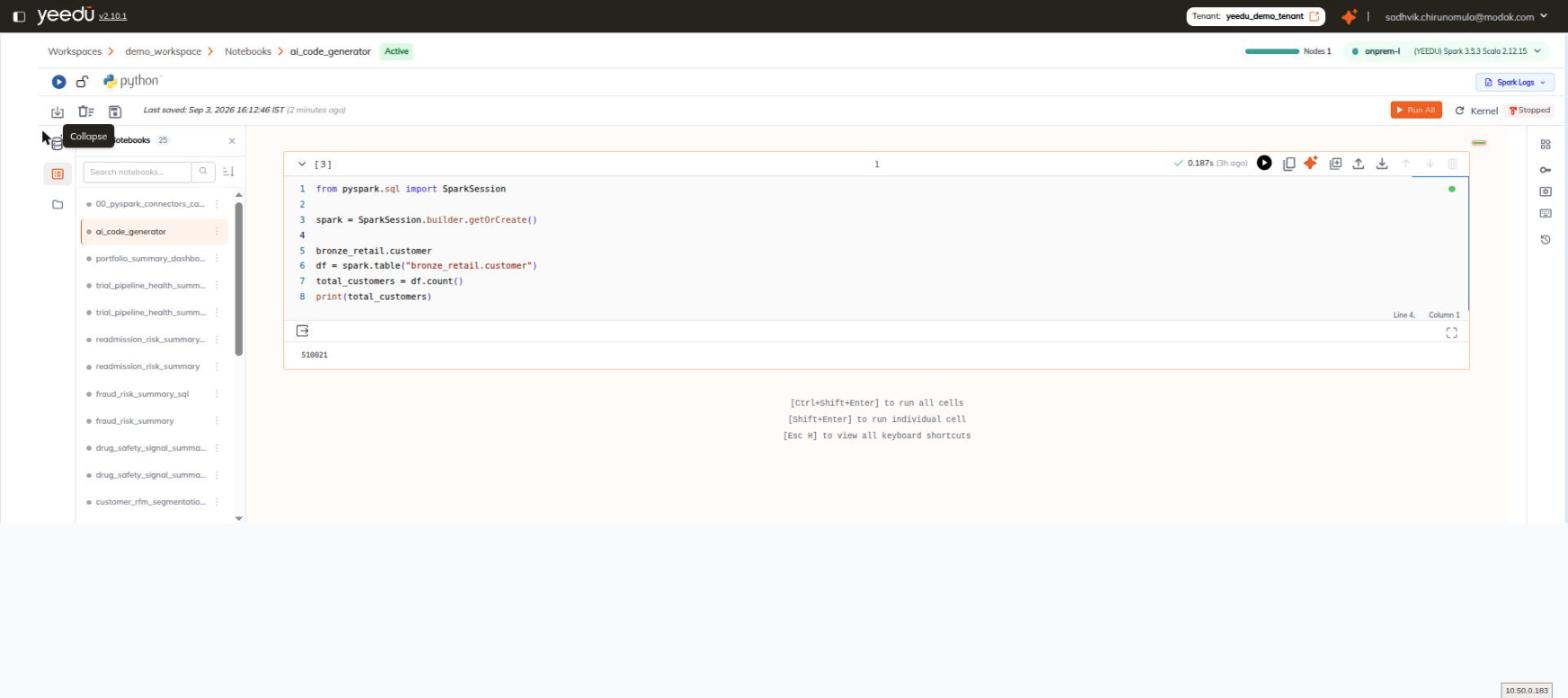
Header
| Element | Detail |
|---|---|
| Title | Notebooks <count> — the number of notebooks in the workspace. |
| Close icon | Closes the panel. |
| Search box | Placeholder Search notebooks.... |
| Sort-order icon | Reverses the list order. |
Rows
Each row shows:
- A status dot.
- The notebook name.
- A kebab menu whose only entry is Export.
The notebook currently open in the editor is highlighted, which matters more than it sounds like it should once a workspace accumulates several dozen notebooks with similar names and the switcher becomes the only reliable indication of where you actually are.
Collapsing the Panel
Click the rail icon again to collapse the panel. Its tooltip reads Collapse. Collapsing returns the full canvas width to the cells, which is worth doing once you've navigated to the notebook you wanted, because the switcher and the editor compete for the same horizontal space and wide result tables are the first thing to suffer.