Auto-Save
Yeedu notebooks save themselves as you work. No configuration is required.
How It Works
- The editor watches for typing in a cell and starts a debounce timer when you stop.
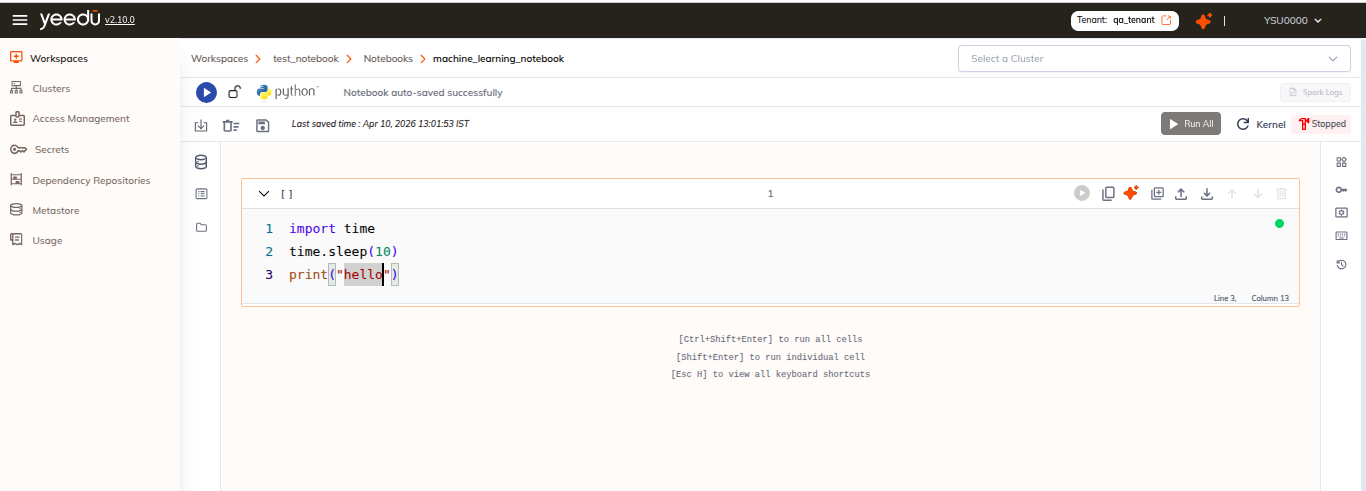
- The notebook is saved automatically a few seconds after typing stops, 3 seconds in a code cell, 2 seconds in a Markdown cell.
- An orange dot marks unsaved changes. Its tooltip reads
Unsaved changes; once the save lands the dot turns green and the tooltip readsAll changes saved. - An autosave raises no toast. Only a manual save reports success.
Saved Indicator
The second row of the editor top bar shows the last save as:
Last saved: <timestamp> (<relative>)
Saving Manually
You don't have to wait for the timer:
| Method | Detail |
|---|---|
| Save icon | The disk icon on the editor top bar. Its tooltip reads Save Notebook. |
| Keyboard | Ctrl + S |
See Keyboard Shortcuts for the full list.
Markdown Cells
We save Markdown cells through the same mechanism as code cells.