Notebook Runs
The Notebook Runs panel lists every run of the notebook currently open in the editor. Open it from the Notebook Run History icon on the right rail of the notebook editor.
The panel is scoped to a single notebook deliberately. When you are investigating why yesterday's scheduled execution produced different numbers from the interactive one you just finished, the comparison you need is between runs of this notebook, and we would rather not bury that inside a workspace-wide history.
Approximate YCU consumption is reported per run. That figure is the one to watch when a notebook graduates from occasional interactive use to a scheduled job executing several times a day, because the incremental cost of an inefficient transformation compounds with the schedule, and a run consuming noticeably more than its predecessors is usually the earliest indication that an upstream table has grown beyond whatever the original implementation assumed about it.
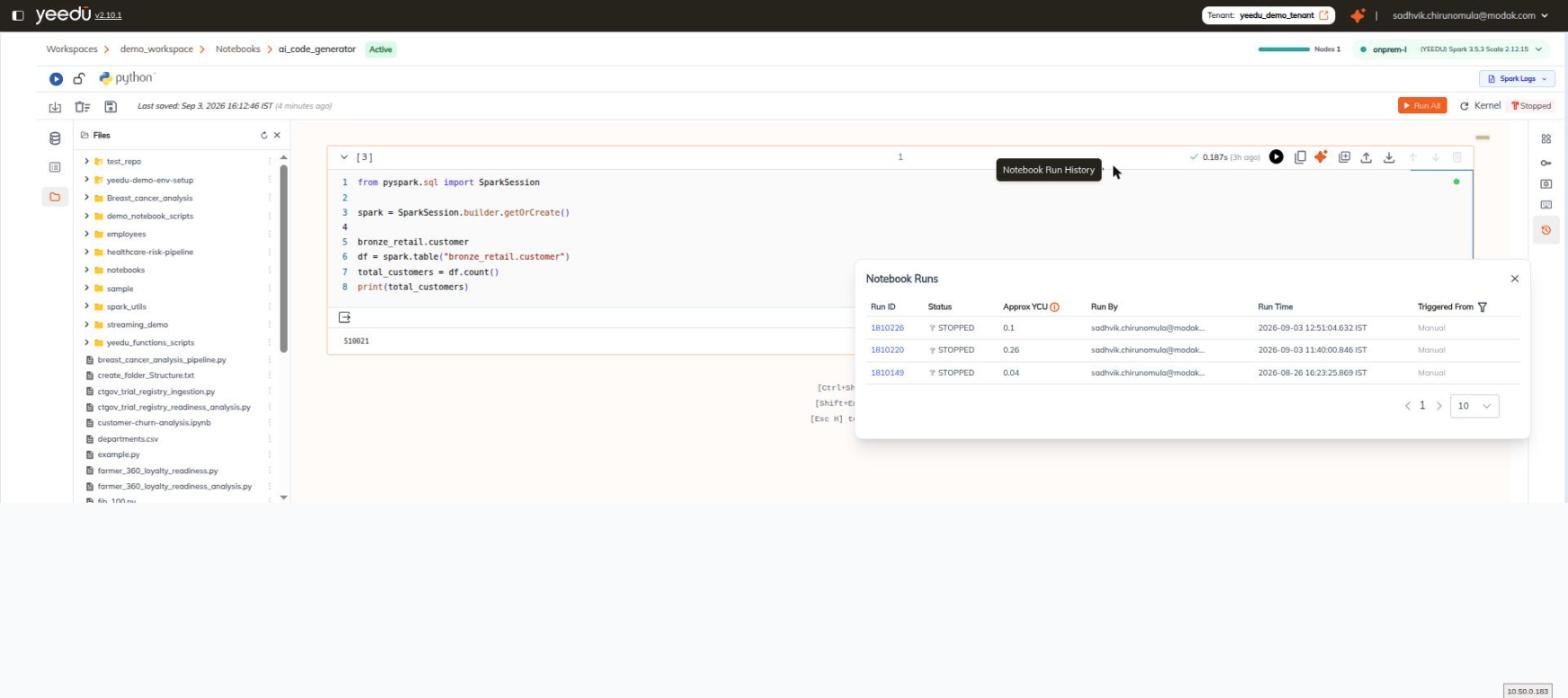
Columns
| Column | Description |
|---|---|
| Run ID | Identifier of the run. Links to the run detail page. |
| Status | Status of the run. |
| Approx YCU ⓘ | Approximate Yeedu Compute Units consumed by the run. Carries an information icon. |
| Run By | User who started the run. |
| Run Time | When the run executed. |
| Triggered From | What started the run. Filterable. |
Triggered From Filter
Triggered From carries a funnel filter icon. The filter offers three values, with an Apply button:
| Value | Meaning |
|---|---|
| All | No filtering — every run. |
| Manual | Runs started by a user from the editor. |
| Airflow | Runs started by Airflow. |
Use Airflow to isolate scheduled, background runs of the notebook from the ones you started yourself.
Pagination
The panel footer carries a pager (< 1 >) and a page-size selector that defaults to 10.