Files Panel
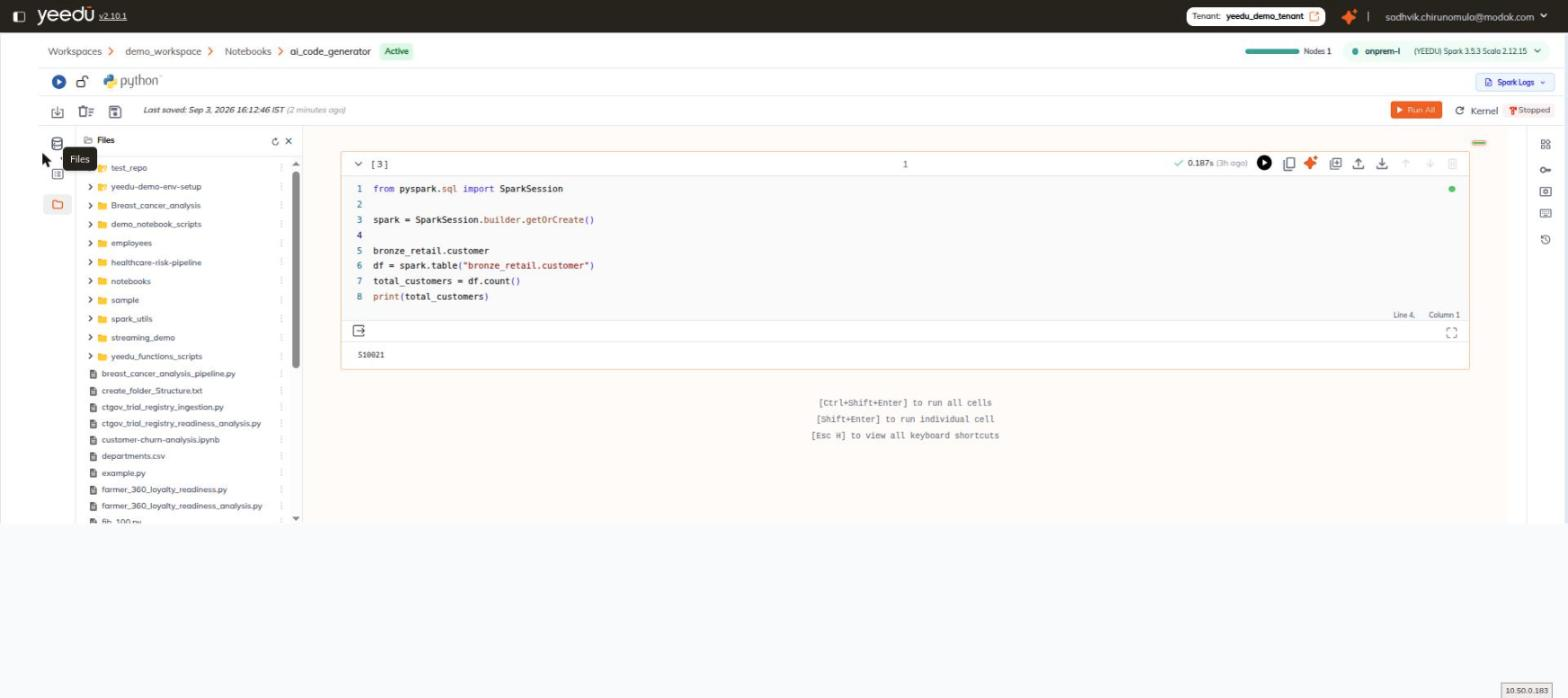
The Files panel browses the workspace file store from inside the notebook editor. Open it from the Files icon on the left rail.
Notebooks rarely stand alone. They read reference data, import helper modules and write results back, and all of that lives in the same workspace file store, so we surface it alongside the editor rather than making you reconcile two separate views of what's actually one directory tree.
Everything the panel shows is the workspace's own storage.
Header
The panel header reads Files and carries a refresh icon and a close icon. Refresh matters because the tree reflects the file store as it stood when the panel opened, and a notebook cell that has written a new output file since then won't be represented until you ask us to re-read it.
Tree
The body is a tree of the workspace file store:
- Folders are listed first. Git-tracked folders carry a distinct marked-folder icon.
- Files follow, including
.py,.txt,.csv, and.ipynbfiles.
Row Actions
Each row has a kebab menu with exactly three entries:
| Entry | Effect |
|---|---|
| Open in new tab | Opens the file in a new browser tab. |
| Download | Downloads the file. |
| Copy path | Copies the file's path to the clipboard. |